

Welcome to KeyPay
- Details
Payroll Software for Business
KeyPay was developed in New Zealand primarily for SMEs (small medium enterprises) employing staff in New Zealand, although, it has in numerous cases more than adequately met the needs of much larger payrolls, with several hundred employees. Simplicity, ease of use and compliance of New Zealand regulations have been at the forefront of any considerations in it's development. This, backed up with our desire to provide our clients with a superior level of service and support, has been our driving force since we first entered this industry in 1985.
KeyPay software has provided practical payroll solutions to employers of 1 to several hundred staff. Client organisations which have utilised KeyPay software represent a wide range of industry and commerce, including manufacturing, retail, marketing, construction, telecommunications, tourism, hospitality, leisure, sport, health, agriculture and horticulture.
KeyPay is easily configured and specifically customised to suit the individual needs of each client company. Whilst KeyPay is full of features and options, these can be selectively switched on or off making only those relevant to each client organisation visible to the user. This makes it simple and very fast to process each pay without any compromise in flexibility. With our latest version 6 many employees can be paid with just 2 keystrokes. It can also import time from a spreadsheet saved as a CSV file.
KeyPay is developed to strictly meet NZ taxation and NZ Holidays Act requirements. While the Act is complicated, we believe that KeyPay is as compliant as possible, given that some areas are subject to interpretation and the decisions made by humans who sometimes make the occasional mistake. We are determined that KeyPay should always minimise these with warnings and confirmation. Considerable effort went into its design to ensure it does the right thing with regard to the law. For example, average leave rates are continuously updated, with the greater of it and ordinary rate always available and applied to leave payments. Work is now in progress to provide seamless switching to the Employee Leave Act in August 2028.
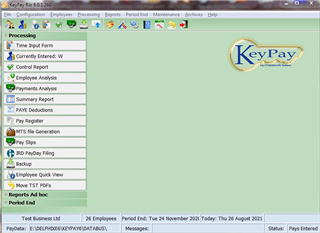
KeyPay Version 6.3.6
- Details
Version 6.3.6
Fixes some bugs and the removal of old and now redundant code.
Built date 16th June.
View KeyPay 6 latest build changes
Tax Updates from April 2026 to March 2027
- Details
Changes from April 2026
A.C.C Earners Levy
Levy increased to $1.75 per $100 on earnings up to a maximum of $156,641 P.A
Student Loans
No Changes - threshold remains at 464 p.w or $24128 divided by the No. of Pays per Year.
KiwiSaver
Employees and Employers on 3% are upgraded to 3.5% from pay-days on or after 1st April 2026.
(And to 4% for pay-days on or after 1st April 2028)
The temporary 3% rate is available for a period of 3 to 12 months with the permission of IRD.
Employee can reset to 3.5% or higher after 3 months on the temporary rate by completing a KS2 form.
Tax Changes
No Changes
PAYE Calculator
- Details
Tax Calculator 4.27
New version for Tax year from August 2025 to March 2027 now available for free under Downloads Calculators.
This version includes the Kiwi Saver 3.5% rate from 1st April 2026
RansomWare
- Details
Ransomware in 2026
Still the biggest internet threat to users and continues to increase every year with clicking links to fake websites the main source of infection.
Recent reports are showing a preference for targeting larger businesses and organisations rather than individual users, probably because they are easier to manage and owners place a much higher value on their data so the rewards are much greater. Also the cost of downtime and effort to recover from backup can be more than just paying up for a quick fix.
The current trend is to not just encrypt ones data, but to download it and threaten to publish the information for anyone to view and attack any people whose details are found.
A major NZ Northland heath provider had their client details downloaded in 2026.
A worrying development is that non programmers have been using Chat GP to develop code for this and other malware purposes. While any use of Chat GP for illegal use is prohibited, and mostly blocked, there are ways around this.
Also be aware of copy and paste instructions which may prompt to fix a problem. A popular source is capture windows. These can be fake and one is very likely to click on to accept ones selection and then requires one to paste a string into a command window. Microsoft could alert one to not do this, but so far its still allowed and the string when executed could do anything. Mostly it sets up full access to your PC from owner of the fake website.
A growing trend is for some Hacker groups to request many much smaller payments in the belief that this is cheap for the company to pay the ransom. However, they have no ability to recover and restore the data.
It has been estimated that victims of ransomware paid over 1 Billion US dollars in 2016 to recover their data and in future it's expected to be much greater. Are you prepared?
Checkout our page about it and how to avoid becoming a victim and if the worst happens to recover without paying up!
Windows 10 support ending
- Details
The Windows 11 TPM Scam...
Microsoft requires computers to support TPM 2 to install Windows 11 and claims its vital for security and is prepared to sentence some 400 million PC's to death. This is unconscionable!
There is no reason that Microsoft cannot support computers with earlier TPM versions that most PC's do support. In fact, many owners purchased their current computer only a few years ago. Some manufactures only fitted TPM 2 to their computers around 2023, and as such should remain O.S supported for 10 years. (Microsoft policy is to provide version support for 10 years.) They should therefore continue support for Windows 10 for up to another 5 years. (If you purchased a PC since 2020 and it doesn't have TPM2, Microsoft should support it until 2030 with Windows 10 or provide a Windows 11 upgrade.)
Experts have advised that TPM 1 is still sufficiently secure and the enhancements that TPM 2 offers are not essential for security at present. Microsoft could easily allow computers with TPM 1 onto Windows 11 with no less security, perhaps with warnings and reduced features than currently available on Windows 11.
Why then are they being so stubborn?
TPM 2 allows Microsoft to have much greater control of your PC by embedding boot keys that they own, forcing the creation of a Microsoft account, and among other things can prevent installing a different system. Some users have had it remove their dual boot operating system.
For full details read the article by Stacy Higgenbothem to Microsoft on these issues. (Link to PDF available on the site below.)
Good News (for some)
Some owners have discovered that their non Windows 11 compatible computers have a software version of TPM and that it can be upgraded to TPM 2 with a simple BIOS update from the manufacturer. Perhaps ask Chat-GPT if your motherboard or model can support TPM 2. However, this software TPM 2 path may have reduced performance compared to the hardware version.
Alternatives - if your current PC cant run Windows 11 ....
Many others, from individuals to corporations, are successfully moving to alternatives. Some to Mac's and others to Linux. In fact, many PC manufacturers are now offering their machines with Linux installed or downgraded to Windows 10. The main reasons are; the price of Windows licenses, support costs and returns, which statistics show are three times higher for windows than Linux.
Linux distributions have improved hugely in the last few years with many mimicking the Windows desktop, and its easy to trial most of them, usually by downloading an ISO image that is saved to a USB drive in a boot-able format which is easily done using a free software utility such as Rufus. Just Google how to do this and any alternative methods. One then boots the PC from the USB drive. Sometimes changes to the PC BIOS or EUFI maybe needed to enable this, although most machines offer a menu to choose the boot device with a function key when first powered on. This might be the hardest part of the whole process!
The beauty of this mode, while a bit slow loading files compared to an installation on the main drive, is its fully usable with Web browser and programs, like an Email client, Office software suite, and media player ready to go. You will find access to your windows files and can open them - usually with Libre Office. And, if you like what you find, there is usually an Icon visible on the desktop to permanently install Linux, either in full or as dual boot with Windows. Although I wouldn't do this without having an independent backup of all your documents and perhaps Windows first.
Because many owners use a web browser for virtually everything, Linux can do everything they need, in fact this is basically what a Chromebook PC is, but without any other installed applications.
For those that must still have Windows access, Windows can be made accessible seamlessly from within Linux by installing WinBoat. Your essential windows apps can then be on the Linux menu and runs like its part of Linux. There are also other ways of running many native windows programs on Linux, such as through Wine. Hundreds of U-tube videos are available that cover the problems with Windows and why and how to move to Linux.
A major advantage of Linux is: no license fees, adverts, or forced updates and a huge range of free software and the ease of installing it. It's all under a single built-in applications menu with click to install, no searching the web with the risk of downloading malware. Also, with a modern PC up to about 8 years old, expect a noticeable increase in general speed over Windows. Linux distributions have very configurable user interfaces and can switch between the look of Windows XP to Windows 11 and many versions in between.
I'm updated this website using an older intel 5 CPU PC that originally came with Vista Basic. It has 4GB of ram running Linux Mint Cinnamon from a USB stick, and Firefox seems dramatically quicker than using it on the currently installed Windows 10.